
Start Here · Lesson 04 of 06
Set up your BioModulator.
Prepare your Tennant BioModulator® for guided use. Learn its power controls, batteries, program selection, and care before your first complete session.
In this lesson
- Recognize the controls and prepare the batteries correctly.
- Learn to load TENNANT mode and adjust energy gradually.
- Understand everyday care and common setup checks.
Continue after BioTransducer Setup. This lesson is for owners of the current-generation Tennant BioModulator.
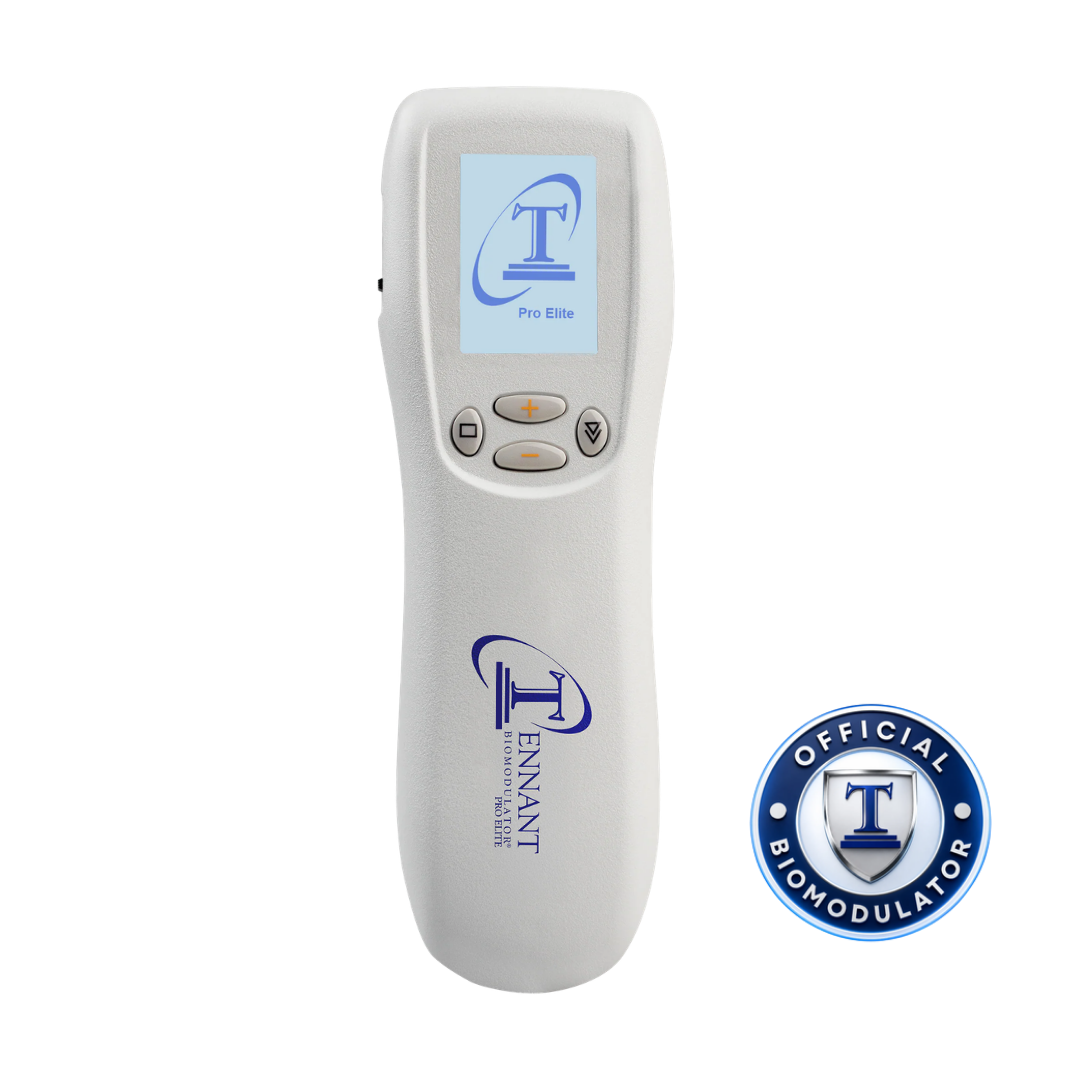
Have these ready
- Your Tennant BioModulator®.
- Four matching new 1.5 V AAA alkaline batteries.
- Your device instructions and storage case.
Do not use rechargeable batteries. Replace all four batteries together and do not mix old and new batteries.
Before operating your device
- Read the complete warnings, precautions, and contraindications supplied with your device.
- Do not use the BioModulator if you have a pacemaker or another implanted electronic device.
- Secure the battery cover before operation. Use the device in a dry environment and keep it and its electrodes out of children’s reach.
Follow your licensed healthcare professional’s guidance. These reminders do not replace the complete device instructions or the positioning and timing taught in your guided session.
Your first setup
Power on. Load TENNANT.
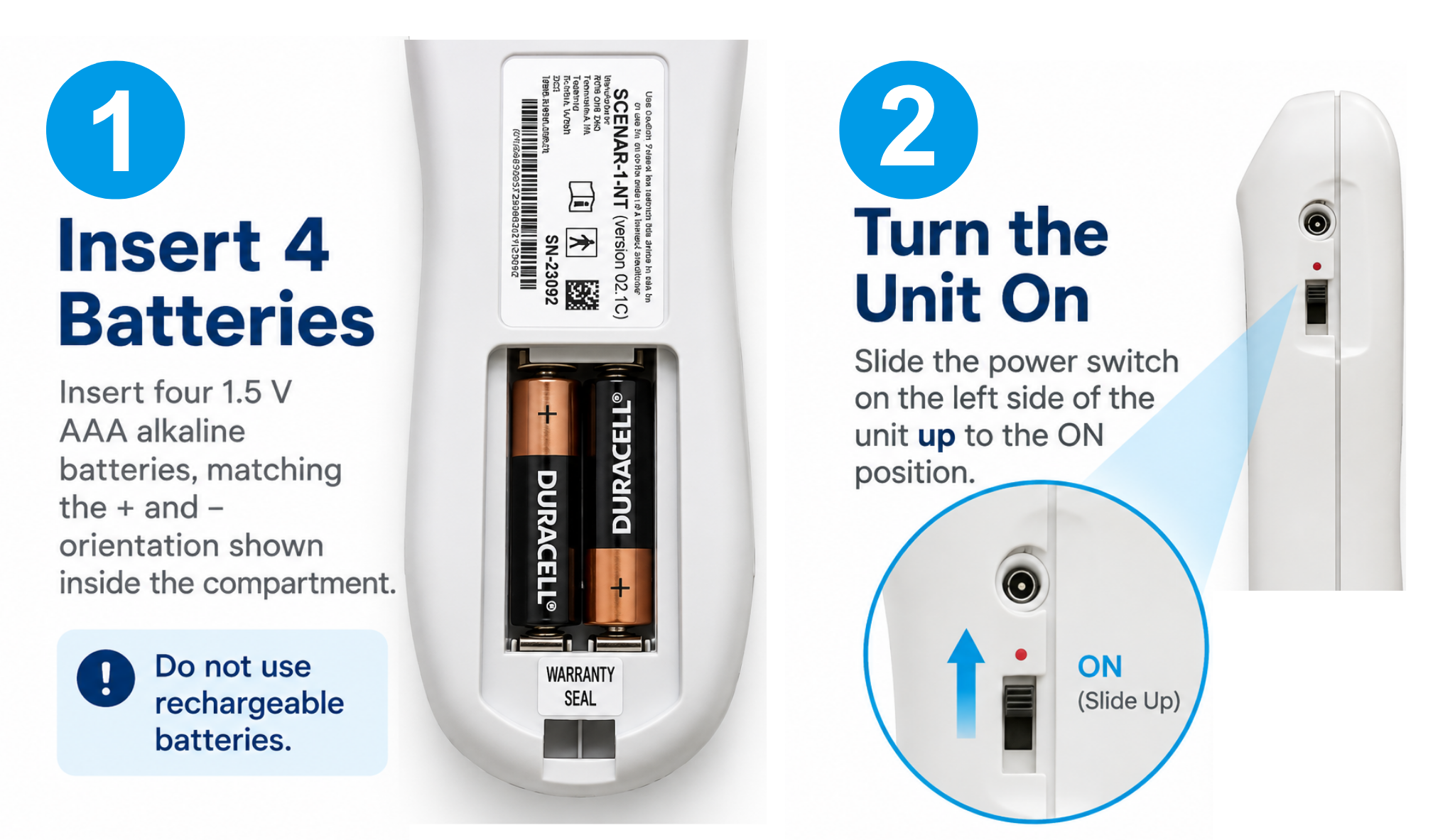
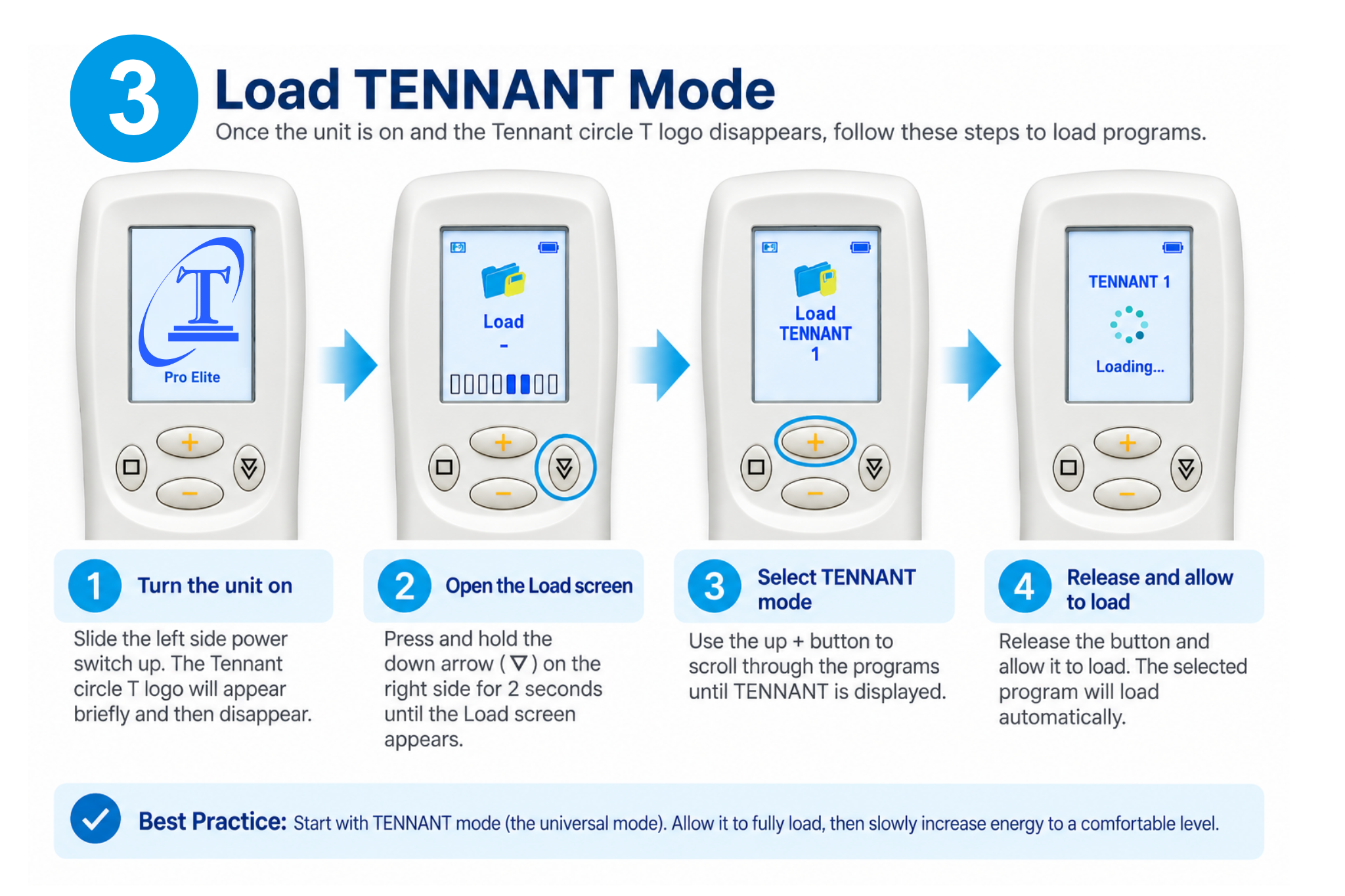
Follow the illustrations and written steps to prepare your BioModulator and select your starting program. Enlarge either illustration for a closer look at the controls.
Before you begin: review the safety checkpoint above and the complete instructions supplied with your device.
1. Install the batteries and turn on
-
01 · Install all four batteries
With the unit off, insert four matching new 1.5 V AAA alkaline batteries, following the + and − markings inside the battery compartment. Refit and secure the battery cover before turning the unit on.
Do not use rechargeable batteries. Replace all four together; do not mix old and new batteries.
-
02 · Slide the switch up to ON
Slide the power switch on the left side of the unit upward to the ON position. The Tennant circle T logo appears during startup. Wait for that logo to disappear before opening the program list.
2. Load TENNANT mode
-
01 · Let startup finish
With the unit switched on, wait until the Tennant circle T logo disappears.
-
02 · Open the LOAD screen
Press and hold the Down Arrow on the right side for 2 seconds. The LOAD screen appears.
-
03 · Select TENNANT
Use the upper Plus (+) button to scroll through the programs until TENNANT is displayed. TENNANT is the universal mode and the first program in the list.
-
04 · Release and allow it to load
Release the button. The selected program loads automatically. Let it finish loading before adjusting energy.
Everyday care & storage
Care for your BioModulator.
Finish each session by switching the unit off. Follow the correct cleaning instructions, and prepare the device before storing or transporting it.
-
01
Switch the unit off
If the built-in electrode is in contact with your body, gently remove it. Move the ON/OFF switch to the OFF position before cleaning or putting the device away.
A dark screen is not a power-off check. The device can enter standby; use the physical switch when you are finished.
-
02
Clean and dry the case
Clean the device case with a damp, not soaking, cloth and a mild soap solution. Keep liquids and cleaning products out of the battery compartment.
Let the device dry completely before use. Follow the separate cleaning instructions for the electrode and any accessory.
-
03
Prepare it for storage
Remove all four batteries when storing or transporting the device to help prevent battery drain and leakage. Keep your device protected in its storage case.
Keep the BioModulator and its electrodes out of children’s reach.
What is the difference between standby and switching off?
When AutoOff is enabled, the BioModulator can enter standby after 30 seconds without button activity or detected skin contact. The display may become dark while the power switch remains ON. When you finish a session, move the physical switch to OFF. A dark display alone does not confirm that the unit has been switched off.
Troubleshooting & next steps
A clear next step when you need help.
Find answers to common BioModulator setup questions. Review the basics, resolve any operating issues, then continue to your first guided session.
If use causes discomfort, stop and consult your licensed healthcare professional. If the device appears to malfunction, stop using it and contact Tennant Health. Do not open the upper casing or attempt an internal repair.
My BioModulator will not turn on. What should I check?
- Move the power switch to OFF. Check that all four batteries follow the + and − markings inside the compartment.
- Replace depleted batteries as a complete set. Use four matching new 1.5 V AAA alkaline batteries. Do not use rechargeable batteries or mix old and new batteries.
- Secure the battery cover. Slide the left-side power switch upward to ON and allow startup to finish.
Review the battery and power illustration. If the device still will not turn on after these checks, contact Tennant Health.
What do five short beeps mean?
Repeated groups of five short beeps can indicate low batteries. Check the battery indicator at the top of the screen. An empty indicator means the batteries need replacement.
Switch the unit off, check battery orientation, and replace all four batteries together when depleted. If beeping continues with correctly installed fresh batteries, contact Tennant Health.
The LOAD screen will not appear.
Wait until the Tennant circle T startup logo disappears. Then hold the Down Arrow on the right side for 2 seconds. This opens the LOAD screen.
Use the upper Plus (+) button to browse to TENNANT, the universal mode and first program. Release the button and allow it to load automatically before adjusting energy.
Review the illustrated loading sequence. If your controls or screen do not match the illustration, ask Tennant Health for instructions specific to your device.
The screen or controls are not responding normally.
Move the physical power switch to OFF. Wait 5–10 seconds, then switch it on again and allow startup to finish.
If the screen disappears, becomes distorted, or the unit fails to start, also check for depleted or incorrectly installed batteries.
If the problem persists or returns, stop using the device and contact Tennant Health. Internal malfunctions must be handled by the manufacturer.
An electrode or accessory is not responding.
Switch the unit off before checking it. For a new device, check whether protective shipping film remains on the built-in electrode. Remove that film before use.
For an add-on electrode, check the connection between its plug and the device jack. Use only manufacturer-recommended electrodes, leads, and accessories.
If an accessory still does not respond, contact Tennant Health for help checking the electrode and cable and confirming the correct replacement. Do not attempt to repair the device internally.
My screen went dark. Is the device switched off?
A dark display alone does not confirm that the unit is off. With AutoOff enabled, the device can enter standby while the physical switch remains ON.
When you finish a session, move the physical switch to OFF. Open the standby mode guide (new tab).
Help the team understand the issue.
Have your device’s model information and serial number available, if present. Describe what appears on the screen, any beeps, the battery type, and the checks you have tried. Include a clear photo of the controls and any accessory involved.
Get BioModulator setup helpBattery and troubleshooting reference: Tennant BioModulator® Operating Manual, revision 09.14.25, printed pages 007 and 011. Follow the instructions supplied for your device.